AI Interior Design free, from a photo of your room
Upload a photo of your room, pick a style and see the same room redesigned: new furniture, colours and materials, with your walls, windows and doors where they are. AI interior design free, 5 designs a day, no account and no watermark.
By ShinobiTools Team · Last updated: September 2026
Redesign my room with AI, from one photo
- Take or choose a photo of the room: JPG, PNG, WEBP or HEIC, up to 20 MB.
- Pick a style: modern, Scandinavian, industrial, boho, Japandi, coastal, mid-century or minimalist.
- Press Redesign my room. After about a minute you get the design, with a slider to compare before and after, and a PNG to download.
The AI keeps the room itself: the walls, windows, doors, ceiling and the camera angle stay where they are. What changes is what you would change in a makeover: the furniture, the colours of walls and floor, materials, lamps, rugs and decoration. Try the same photo in a few styles and compare.
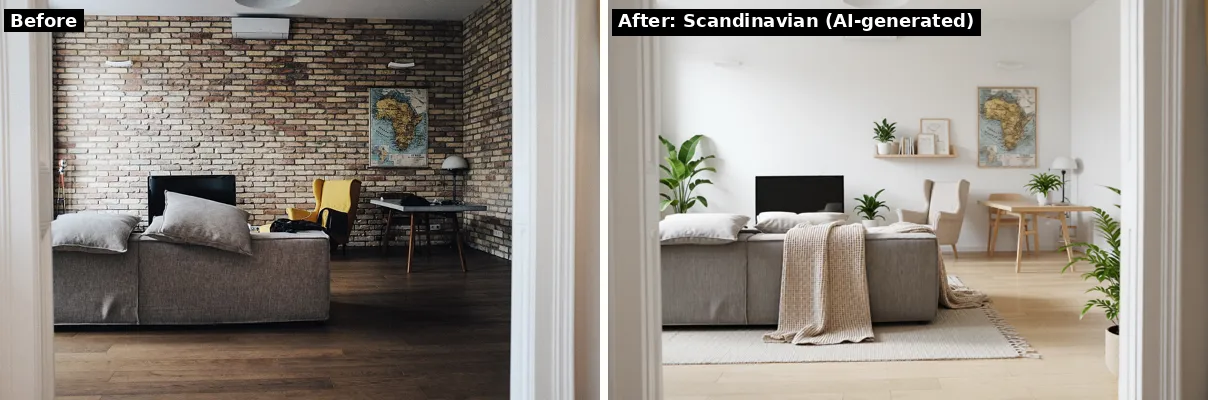
Made with this tool: the brick-wall living room on the left, in Scandinavian style on the right. The doorway, the air conditioner and the ceiling lamp stay put. (Room photo: Unsplash, CC0.)
Eight interior design styles
| Style | What the AI puts in your room |
|---|---|
| Modern | clean lines, white, grey and black, low sleek furniture, little decoration |
| Scandinavian | light oak, white and soft beige, wool textiles, simple furniture, a few plants |
| Industrial | dark metal and reclaimed wood, a leather sofa, black pendant lamps, warm grey walls |
| Boho | warm earthy colours, rattan and wicker, patterned rugs, macrame, lots of plants |
| Japandi | calm and low, natural wood, muted earth tones, linen, paper lamps |
| Coastal | white and sand with soft blue, light linen, natural fibres, bright and airy |
| Mid-century | walnut furniture with tapered legs, mustard and teal accents, retro lamps |
| Minimalist | almost empty, white and warm grey, a few essential pieces, no clutter |
Ideas, not a design drawing
Be clear about what you get: a picture of how the room could look. The AI invents the furniture, so sizes are guessed, the sofa it draws may not exist in a shop, and it does not know where your sockets, radiators or pipes are. Use it to choose a direction and a colour palette, then measure and shop yourself, or take the picture to an interior designer. Interior design AI is a quick way to try eight styles on your own room before you spend anything.
- It works best on a normal, well-lit photo of a whole room, taken from a corner or a doorway.
- A dark evening photo still works, but often comes back in daylight, with a different view out of the window. A blurry or close-up photo gives a weaker design. So does a photo with people in it.
- In an empty room the AI chooses the furniture itself, so a bare bedroom can come back as a living room.
- Now and then the AI changes something it should have kept, like a window frame or the ceiling. Run it again (every run is a new design), or try another style.
- Every design says it is AI-generated: in the file name, and in the image metadata.
AI room design free, and the limit
5 room designs a day are free, with no watermark and no account. Each design keeps most of a graphics card busy for about a minute, which is why this tool has its own daily allowance instead of sharing the 10 a day of the background remover. It resets at midnight. A ShinobiTools pass raises it (up to 30 designs a day) and allows bigger photos. Photos up to 20 MB and 30 megapixels; the design comes back at about 1 megapixel (for example 1248 × 832).
Your room photo is deleted as soon as the design is made, and the design itself 45 minutes later. Nothing is used to train anything.
Want to clear out a room first, or take a person out of the shot? Remove objects from a photo with the magic eraser, then redesign it here.
Common questions
Is this AI interior design tool free?
Yes. 5 room designs a day are free, with no account and no watermark. The allowance resets at midnight.
Can I redesign my room from a photo?
Yes. Upload a photo of the room, pick a style and you get the same room redesigned in about a minute, with a before and after slider.
Does it keep my walls and windows?
Yes, that is what it is built for. The walls, windows, doors, ceiling and camera angle stay; furniture, colours, materials and decoration change. Once in a while it changes a detail it should have kept; then run it again, every run is a new design.
Which interior design styles can I choose?
Modern, Scandinavian, industrial, boho, Japandi, coastal, mid-century and minimalist.
Is this like RoomGPT?
It does the same kind of job: a room photo in, a redesigned room photo out. Here you need no account, and 5 designs a day are free without a watermark.
Can I use the design as a plan to build or buy from?
No. It is an AI-generated idea, not a design drawing. Sizes and furniture are invented, so measure the real room before you buy anything.
Do you keep my photo?
No. Your photo is deleted as soon as the design is made, and the design 45 minutes later.